Introduction
Modern flight test programs generate staggering volumes of data. A single rotorcraft development flight can produce readings from over 6,000 raw parameters simultaneously—analog measurements, bus data, positional data, and video—all timestamped and streaming in real time. Without the right tools to process and display that data, engineers are effectively flying blind.
IADS (Interactive Analysis and Display System) is the software suite that flight test teams rely on to turn that raw telemetry into actionable visibility. Originally developed by Symvionics and acquired by Curtiss-Wright in April 2020, IADS is used across every major U.S. flight test program and many international ones. This guide covers the system architecture, display configuration, and operational requirements that flight test engineers need to deploy IADS effectively.
Key Takeaways
- IADS stands for Interactive Analysis and Display System—real-time and post-test display and analysis software built specifically for aerospace flight test.
- It processes thousands of parameters simultaneously, letting engineers validate test points and make safety calls mid-flight.
- Supported standards include IRIG-106 (Chapters 4, 8, 10), TmNS, and TSPI.
- The architecture scales from a single laptop to a full range workgroup.
- Clean, IRIG-106-compliant telemetry from the ground station is a hard prerequisite.
- At scale, batch export via IADS Data Manager is essential—manual GUI workflows can't keep pace with high-volume program demands.
What Is IADS in Flight Testing?
IADS is a scalable, client-server software suite that gives flight test engineers the ability to monitor, process, archive, and analyze flight data both in real time and after the flight. The IADS Server handles data processing, delivery, and archiving—supporting hundreds of concurrent client connections and hundreds of thousands of parameters. Client workstations connect to that server, each giving individual engineers their own interactive display environment.
Two Primary Operating Modes
Real-time monitoring runs during live test sorties. IADS RTStation provides engineers and pilots with synchronized, live displays of all active parameters, and the Scrollback feature lets any engineer pause the feed and review any prior moment—with all data channels locked to the same timestamp. Data latency from test vehicle to display workstation is less than one-quarter second, which is a firm requirement for real-time safety-of-flight decisions.
For post-flight work, engineers turn to IADS Post Test Explorer to search, filter, and visualize archived data across multiple test sessions. Common tasks include validating test point completion, generating Nichols plots and FFTs, identifying anomalies, and packaging data for downstream design teams.
Display Types IADS Supports
IADS supports a wide range of display types out of the box:
- Strip charts and cross-plots
- Fast Fourier Transforms (FFTs)
- Nichols plots for control system analysis
- Moving maps and artificial horizon displays
- Aircraft-style gauges and custom instruments
Why IADS Analysis Is Critical in Aerospace Flight Test
Flight test programs operate under two overlapping pressures: safety and schedule. Both hinge on data visibility.
Real-time IADS monitoring gives range safety officers and flight test engineers the continuous parameter visibility needed to detect anomalies before they become incidents. The DOT&E FY 2024 Annual Report noted that only 53% of eligible programs had adequate funding for planned test execution, with 16% reporting funding shortfalls across the DoD.
Repeat sorties and unplanned flight extensions aren't just expensive — they consume a finite test budget that most programs can't afford to erode.
Poor data management compounds schedule pressure fast. The F-35 Block 4 modernization program has accumulated more than $6 billion in cost growth and is at least five years behind original schedule — a direct consequence of compounding test and software delays. That's the environment flight test engineers are working to stay ahead of.
What IADS Delivers in Practice
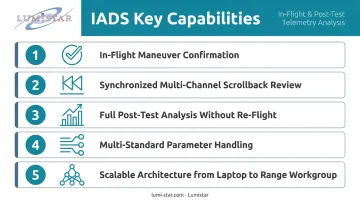
- Confirms maneuver completion during the flight, not hours later
- Revisits any moment in the test across all data channels and video simultaneously
- Supports full post-test analysis without re-flying the aircraft
- Handles hundreds of simultaneous parameters across IRIG-106, TmNS, MIL-STD-1553, and TSPI inputs
- Scales from a single engineer's laptop to a full multi-station range workgroup on the same software
How IADS Flight Test Analysis Works – Step by Step
IADS analysis follows a structured workflow tied directly to test operations. Shortcuts at any stage—especially parameter definition or post-test review—create problems that are harder to fix later than to prevent upfront.
Step 1 – Define Test Objectives and Test Points
Before the aircraft leaves the ground, engineers define the specific maneuvers and conditions to be evaluated: level flight at a given speed and altitude, coordinated turns, deceleration profiles. Each "test point" becomes a timestamped data slice that focuses analysis on the maneuver of interest.
IADS allows parameter definitions, display configurations, and analysis setups to be customized quickly before each flight, so the right data is surfaced for each objective.
Step 2 – Instrument the Aircraft and Configure Data Acquisition
Flight test instrumentation (FTI) hardware—data acquisition units, sensors, encoders—is installed on the test aircraft to capture raw parameters. These are organized into data groups by source type and sample rate, which maps directly to how IADS will process and export the data later.
Common pitfall: Poorly defined data groups or mismatched sample rates at this stage create downstream problems in IADS that are time-consuming to fix. Resolve these before the first flight.
Step 3 – Transmit and Receive Telemetry Data
During flight, the aircraft transmits data via RF to a ground station, where it is received, demodulated, and decoded before being passed to the IADS server for real-time processing. Signal dropouts, degradation, or non-compliant formats corrupt the IADS data stream before it can be useful—so data quality at this stage directly determines what analysis is possible.
Telemetry ground station infrastructure is where that quality is won or lost. Lumistar's IRIG-106-compliant systems (including the LS-28-DRSM series portable receiver/combiner) are explicitly designed and tested for compatibility with IADS real-time display software.
They deliver RF-to-UDP TMoIP multicast output with dual-channel reception from 200 MHz to 6 GHz, providing clean, standards-compliant data to the IADS server.
Step 4 – Monitor Data in Real Time with IADS
With the telemetry link active, IADS RTStation provides live, synchronized displays across all engineer workstations. The Scrollback feature allows any team member to pause the live feed and review a prior data point—useful when a test card event needs immediate review without interrupting the ongoing sortie.
Range-wide collaboration: IADS's client-server architecture lets multiple engineers at distributed workstations simultaneously view and interact with the same live data, each with their own display configuration.
Step 5 – Perform Post-Test Analysis
IADS Post Test Explorer handles the deep work after landing. Engineers search and filter archived data across sessions, validate test point completion, generate frequency-domain plots, and export data for downstream teams.
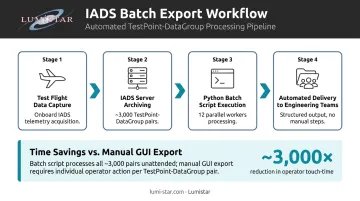
At scale, this stage can become a significant bottleneck. A rotorcraft development program documented in a 2022 conference paper on IADS data exporting processed roughly 3,000 TestPoint-DataGroup pairs per flight—a workload that makes manual GUI-based export completely impractical. IADS's Data Manager utility supports batch, command-line-driven export, enabling teams to automate and run exports in parallel, cutting hours off post-flight turnaround.
Step 6 – Act on Findings and Close the Loop
IADS analysis only delivers value when findings drive action: updated test cards, system design changes, go/no-go decisions for the next sortie. The feedback loop from data insight to program action is where the investment in real-time and post-test analysis pays off.
Treat IADS analysis as a continuous process, not a one-time post-flight task. Each sortie should refine the parameter definitions, display configurations, and analysis setups for the next—progressively sharpening what the data reveals.
IADS in Practice – A Real-World Case Walkthrough
Consider a multi-phase rotorcraft flight test program at the scale of the T625 helicopter development effort: approximately 6,000 raw parameters (including 1,000 analog measurements), with around 3,200 selected for telemetry transmission at roughly 50 Mbps on-board Ethernet-packet recording rate.
The Data Scale Problem
Even with a moderate number of flights, the combination of test points and data groups generates thousands of individual export combinations per flight. What worked in the early program phase—manual GUI-based export through IADS Post Test Explorer—became unworkable as the test matrix grew. Schedule pressure made this bottleneck immediately visible.
The Solution: Batch Processing
The team identified that IADS Data Manager, included with the IADS Server license, can be run from a terminal without an active IADS Client. This enabled scripted, parallel export workflows. Using Python with 12 workers on a 24-core processor, the team automated export of the ~3,000 TestPoint-DataGroup pairs per flight—completing deliveries that the GUI workflow could not have met on schedule.
The Broader Lesson
The structured approach to batch export did more than solve an immediate bottleneck. The batch workflow delivered critical data to downstream structural and aerodynamic engineering teams on schedule, and exposed the need for a more scalable data architecture in future program phases. Programs that treat IADS as a GUI-only tool will hit these walls earlier than those that plan for terminal-driven, scripted workflows from the start.
How Lumistar Supports IADS-Based Flight Test Programs
IADS is only as effective as the data reaching its server. That means telemetry ground station infrastructure directly determines real-time monitoring capability.
Lumistar designs and manufactures IRIG-106-compliant telemetry components and complete ground station systems from its San Marcos, California facility — all products designed and built in the USA. Since 2000, Lumistar has worked exclusively in aeronautical flight test telemetry, and its engineering team brings over 100 years of combined experience in the field.
What Lumistar Brings to IADS Programs
The LS-28-DRSM series is explicitly tested and confirmed compatible with IADS real-time display software. These systems deliver RF-to-Ethernet UDP data output in IRIG-218 or Chapter 10 format — the clean, timestamped, standards-compliant stream that IADS requires.
Lumistar's product evolution transformed typical ground stations from 8-foot, 250 kg rack systems consuming thousands of watts into hand-held units under 1 kg drawing 40–50 watts. The portable LS-28-DRSM-P1 is small enough to carry on a commercial flight, making high-quality telemetry reception deployable far beyond fixed range infrastructure.
Lumistar partnered directly with Curtiss-Wright IADS on the Kansas Supersonic Transportation Corridor (SSTC) program with Wichita State University's NIAR — providing telemetry tracking, receiving, and processing systems while IADS handled real-time display and analysis.
For program managers, Lumistar addresses the practical concerns that affect schedules and budgets:
- Short lead times backed by maintained component inventory
- Unlimited post-delivery technical support — direct access to application engineers, typically resolved on the first call
- Complete solutions from RF reception through data delivery, including custom builds
- IRIG-106 Class I and II compliance across the product line
Conclusion
IADS delivers the real-time visibility and post-test analytical depth that modern flight test programs require. But its effectiveness depends entirely on the data chain upstream: well-configured FTI hardware, reliable telemetry reception, disciplined test point definition, and systematic post-test workflows.
Programs that treat telemetry infrastructure as an afterthought typically discover those gaps under schedule pressure, not during planning. The teams that get the most out of IADS are the ones who understand the full workflow — from RF reception through PCM decommutation to batch export — and size their ground station hardware accordingly before the test campaign begins.
Frequently Asked Questions
What does IADS stand for?
IADS stands for Interactive Analysis and Display System. It is a real-time and post-test data display and analysis software suite developed originally by Symvionics and now maintained by Curtiss-Wright Defense Solutions, purpose-built for aerospace and defense flight test programs.
How does IADS work?
IADS operates on a client-server architecture. The IADS Server receives, processes, and archives telemetry data in real time during flight, while client workstations let engineers visualize and analyze that data simultaneously across distributed displays throughout the test range.
What data formats and standards does IADS support?
IADS supports IRIG-106 Chapters 4, 8, and 10 (including Chapter 10 UDP), the Telemetry Network Standard (TmNS) as defined in IRIG-106-19, TSPI positional data, MIL-STD-1553 bus data, and metadata formats including TMATS, XML, and XidML.
What is IADS RTStation?
IADS RTStation is the real-time monitoring component of the IADS suite, providing pilots and flight test engineers with live, synchronized data displays during a test flight. Its Scrollback feature lets any engineer pause the live feed and review any prior moment across all data channels simultaneously.
Can IADS be used aboard the test aircraft?
Yes. The Curtiss-Wright Airborne IADS NXDP-3000-1 integrates the full IADS RTStation software into a ruggedized, SWaP-optimized mission computer that flies onboard the test aircraft, giving pilots and onboard engineers direct access to real-time data analysis without relying on the ground station link.
How does IADS handle large-scale data export in complex programs?
IADS's Data Manager utility supports batch, command-line-driven export without requiring an active IADS Client — critical for programs with thousands of TestPoint-DataGroup combinations. Teams can script and parallelize export workflows well beyond what manual GUI-based extraction can achieve.