The good news: a growing set of free and open-source tools now covers circuit simulation, 3D electromagnetic analysis, and RF network processing with genuine technical depth. Microwave Journal's 2025 RF EDA analysis links simulation demand directly to mmWave, dense RFIC/MMIC integration, and 6G systems—domains where early-stage simulation saves significant prototype time.
This article covers five free tools that together span the full RF simulation stack, with enough detail to help you match the right tool to the right task.
Key Takeaways
- QucsStudio — Best free Windows RF circuit simulator with harmonic balance and Verilog-A support
- openEMS — Free 3D FDTD EM solver for antenna and waveguide work; runs via MATLAB, Octave, or Python
- LTspice — Best free SPICE tool for RF circuit-level analysis with broad vendor model support
- Sonnet Lite — Free planar EM solver purpose-built for microstrip and stripline passive component design
- scikit-rf — Free Python library for S-parameter analysis and VNA calibration workflows
What Is RF Simulation and Why Do Engineers Use It?
RF simulation falls into three distinct categories, each solving a different problem:
- Circuit simulation — models component-level electrical behavior using lumped elements or SPICE models; fast but increasingly approximate above a few GHz
- Electromagnetic (EM) simulation — solves Maxwell's equations to predict field propagation, radiation patterns, and EMI/EMC behavior in physical structures
- System-level simulation — evaluates end-to-end link budgets and signal chain performance across a full RF path
Engineers apply these across wireless communications, automotive radar, IoT device design, satellite links, and aerospace/defense flight test telemetry—anywhere predicting signal behavior before hardware build reduces costly prototype cycles.
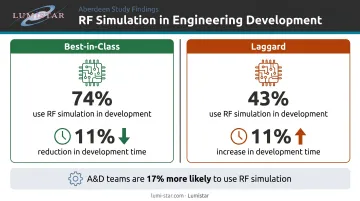
The data backs this up. Aberdeen's PCB design study, based on 178 respondents, found that Best-in-Class teams used analog, RF, or digital simulation 74% of the time versus 43% for Laggard companies, cutting development time 11% over two years while Laggards saw theirs increase by the same margin.
Aerospace and defense firms drove much of that gap — the same research found A&D teams are 17% more likely to use RF simulation than non-A&D counterparts, reflecting how critical pre-hardware analysis is in high-reliability programs.
Free tools deliver these same productivity gains at the concept and early design stage — before commercial license costs are warranted.
Top Free RF Simulation Software for Engineers
These five tools represent distinct simulation categories—circuit, 3D EM, SPICE, planar EM, and network analysis. The intent is task-specific selection, not finding one tool that does everything.
QucsStudio
QucsStudio is a free Windows-based circuit and system simulation environment descended from the open-source Qucs project. It's actively maintained with a more frequent update cycle than its predecessor. Note that it is not open source, though it runs on other operating systems via Wine.
Its standout capability is harmonic balance simulation, which is rare among free tools and essential for analyzing nonlinear RF circuits like power amplifiers and mixers. The interface follows industry-standard EDA conventions, which reduces ramp-up time for engineers already familiar with Keysight or Cadence environments.
A 2021 IEEE URUCON paper demonstrated QucsStudio's real-world applicability: researchers used it to design a 1.9 GHz SDR microwave amplifier with an HBT device, fabricating an FR4 prototype that achieved 10.4 dB gain with broadband response from 1.06 GHz to 1.96 GHz.
| Attribute | Details |
|---|---|
| Simulation Type | Circuit and system-level (linear, AC, transient, harmonic balance) |
| Key Features | Harmonic balance, Verilog-A support, Smith chart display, S-parameter analysis, Touchstone export |
| Best For | RF filter, amplifier, and mixer design; Windows users needing a full-featured free EDA environment |
openEMS
openEMS is a free, open-source 3D electromagnetic field solver using the Finite Difference Time Domain (FDTD) method. Started by Thorsten Liebig at the University of Duisburg-Essen in February 2010, it uses MATLAB or GNU Octave as its primary scripting interface, with a Python interface available for modern workflows.
The solver handles Cartesian and cylindrical coordinates, near-field to far-field transforms, multithreading, and MPI for parallel computation. Official tutorials include a rectangular waveguide S-parameter example and a patch antenna phased-array far-field pattern calculation—both representative of production antenna design tasks.
| Attribute | Details |
|---|---|
| Simulation Type | 3D electromagnetic (FDTD full-wave EM) |
| Key Features | Radiation pattern output, S-parameter extraction, MATLAB/Octave/Python scripting, GPL v3 licensed |
| Best For | Antenna design and optimization, waveguide analysis, EMI/EMC field studies; engineers comfortable with scripting environments |
LTspice
LTspice is Analog Devices' free SPICE simulator (available for Windows and macOS) with a large installed base across industry and academia. It includes macromodels for select ADI components and supports generic SPICE netlists and third-party vendor models, making it straightforward to import RF transistor and passive models from component suppliers.
One important limitation to flag: LTspice does not natively read Touchstone .s2p files and cannot directly generate compliant S-parameter files, per ADI's own EngineerZone documentation. This makes it less suitable as a standalone RF tool at microwave frequencies, but it remains the standard starting point for SPICE-level circuit validation.
| Attribute | Details |
|---|---|
| Simulation Type | SPICE circuit simulation (transient, AC, DC, noise) |
| Key Features | Large built-in model library, third-party SPICE model import, waveform viewer, cross-platform (Windows/Mac) |
| Best For | RF circuit design validation, LNA and amplifier bias analysis, filter prototyping using SPICE models |
Sonnet Lite
Sonnet Lite is the free entry-level version of Sonnet Software's professional planar EM suite. It applies the Method of Moments directly to Maxwell's equations for accurate electromagnetic analysis of planar structures: microstrip, stripline, coplanar waveguide, spiral inductors, and multilayer PCB stackups.
The free version uses the same solver core as the commercial product. The key constraint: Sonnet Lite handles approximately 1,400 subsections for lossless circuits and 1,000 when loss is included. That's sufficient for individual passive components and small filter structures, but limits larger PCB sections. Output is Touchstone format (.s1p through .snp), which feeds directly into circuit simulators like QucsStudio or LTspice.
| Attribute | Details |
|---|---|
| Simulation Type | Planar electromagnetic (Method of Moments, 2.5D EM) |
| Key Features | Accurate S-parameter extraction, Touchstone export, microstrip/stripline/CPW support, same MoM core as commercial version |
| Best For | PCB RF passive design (filters, couplers, baluns), MMIC analysis, engineers needing S-parameter data for circuit simulators |
scikit-rf
scikit-rf (skrf) is an open-source, BSD-licensed Python library for RF and microwave engineering, created in 2009 at the University of Virginia's millimeter-wave research lab. Version 1.0.0 was released in 2024, and the project now has more than 5,700 commits and 80+ contributors on GitHub.
Unlike the other tools here, scikit-rf has no standalone GUI. It's a programmable analysis toolkit: you work in Python to process S-parameter data, run calibration algorithms, convert between domains, and generate Smith chart or rectangular plots.
It natively reads and writes Touchstone files and implements SOLT, TRL/multiline TRL, and LRM calibration routines. IEEE Microwave Magazine published a dedicated paper on scikit-rf in 2022 covering its network analysis, circuit building, and VNA calibration workflows.
| Attribute | Details |
|---|---|
| Simulation Type | Network analysis, S-parameter processing, VNA calibration (Python library) |
| Key Features | Touchstone file I/O, SOLT/TRL/LRM calibration, time-domain conversion, Smith chart and rectangular plotting |
| Best For | RF measurement data analysis, automated test workflows, VNA calibration, engineers working in Python environments |
How to Choose the Right Free RF Simulation Tool
Defaulting to one familiar tool — LTspice being the usual suspect — for tasks it wasn't designed to handle is a reliable way to end up with misleading results. Using a SPICE simulator to analyze a distributed microstrip filter, or a circuit simulator when you need radiation pattern data, leads to dead-end workflows.
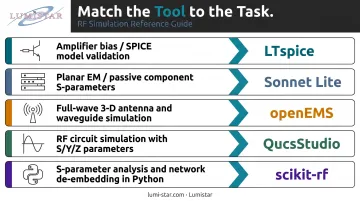
Match the tool to the simulation domain first:
- Need to analyze amplifier bias, filter transient behavior, or verify a SPICE model? → LTspice
- Designing a microstrip filter, coupler, or balun on PCB? → Sonnet Lite
- Modeling antenna radiation patterns or waveguide modes? → openEMS
- Simulating an RF amplifier or mixer with nonlinear behavior? → QucsStudio
- Processing VNA measurement data or building an automated RF test pipeline? → scikit-rf
Beyond domain fit, evaluate these factors before committing:
- OS compatibility — QucsStudio is Windows-native; LTspice runs on Windows and macOS; openEMS and scikit-rf are cross-platform
- Model availability — check whether SPICE models exist for your specific transistors and passives before assuming LTspice will work
- Export format compatibility — confirm whether the tool outputs Touchstone (.s2p, .s3p) or SPICE netlists that match downstream tools in your flow
- Scripting requirement — openEMS and scikit-rf require comfort with MATLAB/Octave or Python; QucsStudio and Sonnet Lite are GUI-driven
For engineers in aerospace or defense programs, verify that the tool's outputs (Touchstone S-parameter files, field data) can be imported into a commercial platform for final system-level verification. If simulation work needs to feed into Keysight ADS or Ansys HFSS for program documentation, confirm that import path before committing significant time to any free tool workflow.
Limitations of Free RF Simulation Software
Free tools work well for early-stage design, concept validation, and educational use — but they have real gaps that matter as designs mature.
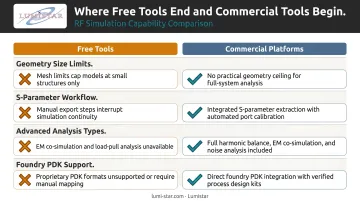
Capability gaps to know:
- Geometry size limits — Sonnet Lite's ~1,400 subsection ceiling restricts analysis to individual passive components, not full PCB sections
- S-parameter workflow gaps — LTspice lacks native Touchstone .s2p reading and cannot directly generate compliant S-parameter files
- Advanced analysis types — load-pull simulation, EM-circuit co-simulation, electrothermal co-simulation, and AXIEM/Clarity-class 3D EM integration are commercial-platform capabilities not replicated in free tools
- Foundry PDKs — production MMIC design requires foundry-certified process design kits not available in free tools
Support and traceability gaps:
Beyond features, the support structure matters. Commercial tools include dedicated technical support, training, and certified validation benchmarks. Free tools rely on community forums and project documentation — a real difference for defense and aerospace programs operating under strict schedules.
Simulation traceability is a real requirement in many A&D programs. When IRIG 106 compliance, range interoperability, or program documentation standards apply, the simulation chain needs to be defensible. Free tools can contribute to early-stage analysis, but production-level hardware demands final verification in certified commercial environments.
Conclusion
QucsStudio, openEMS, LTspice, Sonnet Lite, and scikit-rf together cover the full RF simulation stack at no cost. None of them does everything—but used correctly, they give engineers capable circuit, planar EM, 3D EM, and network analysis without requiring a commercial license in the design exploration phase.
For engineers working toward hardware deployment in aerospace or flight test telemetry programs, simulation is the starting point, not the finish line. When designs need to translate into certified, IRIG-106-compliant hardware, working with a specialized manufacturer matters.
Lumistar designs and manufactures RF telemetry reception, processing, and retransmission systems in the USA. Product families span multi-band RF reception, demodulation, bit synchronization, and range retransmission — all compliant with IRIG 106 Chapter 4 Class I and Class II requirements.
To discuss how Lumistar's telemetry hardware fits your simulation-based design process, reach out to the team at sales@lumistar.net or call 760-431-2181.
Frequently Asked Questions
What is the difference between circuit simulation and EM simulation in RF design?
Circuit simulation models component electrical behavior using lumped elements or SPICE models. It works well at lower frequencies but becomes increasingly approximate as wavelengths approach component dimensions. EM simulation solves Maxwell's equations directly on physical structures, capturing distributed effects, radiation, and EMI that circuit models miss at microwave frequencies.
What is the best free RF simulation software for beginners?
LTspice is the natural starting point for engineers already familiar with SPICE concepts, given its well-documented model library and wide community support. QucsStudio suits engineers who want a more RF-specific GUI environment with harmonic balance capability built in—both have active user communities and good documentation.
Can free RF simulation tools be used for professional aerospace or defense applications?
Free tools are well-suited for early-stage design exploration and concept validation. Production-level aerospace and defense programs typically require commercial tools with foundry-certified device models, dedicated technical support, and simulation traceability to satisfy program documentation and compliance requirements.
Is LTspice good enough for RF simulation?
LTspice handles RF circuit-level analysis well, covering amplifier bias, filter behavior, and transient analysis using available SPICE models. It lacks harmonic balance and native Touchstone S-parameter support, so it works best alongside Sonnet Lite or QucsStudio in a multi-tool flow.
What are the main limitations of free RF simulation software compared to commercial tools?
The main gaps are geometry and cell size restrictions, no foundry-certified device models, limited advanced analyses (load-pull, electrothermal co-simulation), and no dedicated technical support. Commercial platforms like Keysight ADS and Ansys HFSS address all of these directly.